

Get Aug-2026 Download Latest & Valid Questions For Salesforce B2B-Commerce-Developer exam
Ensure Success With Updated Verified B2B-Commerce-Developer Exam Dumps
NEW QUESTION # 69
A developer exports data from an org on a standard entity which has a custom attribute. When they launch Data Loader, select the entity, click the Select All Fields button and click Finish, the custom field they added called MyCustomField_c has no values and no column header in the CSV file. What is the root cause?
- A. The user has rights to the field but there are no values in it
- B. A mapping file was not used when the data was loaded in
- C. The user does not have access to the field
- D. The user needs to install a specific Zulu JDK that is recommended by Salesforce.
Answer: C
Explanation:
The root cause of why the custom field MyCustomField__c has no values and no column header in the CSV file is that the user does not have access to the field. A user's access to a field is determined by theirprofile and permission sets, which define their field-level security settings. Field-level security settings control whether a user can see, edit, or delete the value for a particular field on an object. If a user does not have access to a field, they will not be able to view or modify its value in any interface, including Data Loader. Data Loader is a tool that allows users to import or export data between Salesforce and CSV files. When using Data Loader to export data from an org, Data Loader will only include fields that are accessible to the user based on their field-level security settings. If a user does not have access to a field, Data Loader will not include that field in the CSV file, neither as a column header nor as a value. The user needs to install a specific Zulu JDK that is recommended by Salesforce is not the root cause of why MyCustomField__c has no values and no column header in the CSV file, as it is not related to field access or Data Loader functionality. A mapping file was not used when the data was loaded in is not the root cause either, as it is not related to field access or Data Loader functionality. A mapping file is an optional file that maps fields between Salesforce objects and CSV files when using Data Loader to import or export data. The user has rights to the field but there are no values in it is not the root cause either, as it contradicts the fact that MyCustomField__c has no column header in the CSV file. If the user had rights to the field but there were no values in it, Data Loader would still include MyCustomField__c as a column header in the CSV file, but leave its values blank. Salesforce References:
[Data Loader Guide: Export Data from Salesforce], [Data Loader Guide: Field Mapping], [Salesforce Help:
Set Field-Level Security]
NEW QUESTION # 70
What are three ways to test the value of Page Label on any Salesforce B2B Commerce Community Page? (3 answers)
- A. Access the source HTML for the page viathe browser developer tools.
- B. Enable the 'display page label names' in cc admin.
- C. Execute CCRZ.processPageLabelMap('PAGE_LABEL_NAME') in the JavaScript console.
- D. Execute CCRZ.pagevars.pageLabels['PAGE_LABEL_NAME') in the JavaScript console.
- E. Execute (('PAGE_LABEL_NAME')) in the JavaScript console
Answer: B,C,D
Explanation:
Explanation
Three ways to test the value of Page Label on any Salesforce B2B Commerce Community Page are:
* Execute CCRZ.pagevars.pageLabels['PAGE_LABEL_NAME'] in the JavaScript console. This will return the value of the page label with the given name from the pagevars object, which contains all the page labels that are used on the page.
* Execute CCRZ.processPageLabelMap('PAGE_LABEL_NAME') in the JavaScript console. This will return the value of the page label with the given name from the pageLabelMap object, which contains all the page labels that are defined in CCAdmin.
* Enable the 'display page label names' in cc admin. This will display the name of each page label next to its value on the storefront pages, which can help identify and verify the page labels. Salesforce References: B2B Commerce and D2C Commerce Developer Guide, Page Labels
NEW QUESTION # 71
Which practice is allowed when it comes to naming a Lightning web component's folder and associated files?
- A. Using consecutive underscores
- B. Using a single underscore
- C. Using a single hyphen (dash)
- D. Including whitespace
Answer: C
Explanation:
Explanation
To name a Lightning web component's folder and associated files, the developer should follow these naming rules:
* Must begin with a lowercase letter
* Must contain only alphanumeric or underscore characters
* Must be unique in the namespace
* Can't include whitespace
* Can't end with an underscore
* Can't contain two consecutive underscores
* Can't contain a hyphen (dash)
The only exception to the last rule is when separating the namespace from the component name in markup. For example, if the component is in the example namespace and has the name myComponent, the folder name should be myComponent, but the markup tag should be <example-my-component>. The hyphen character (-) is required by the HTML standard for custom element names. The other options are either invalid or not recommended. For example, including whitespace or using consecutive underscores will cause errors, and using a single underscore will look odd and may confuse developers consuming the component. References: B2B Commerce and D2C Commerce Developer Guide, Lightning Web Components Developer Guide
NEW QUESTION # 72
Which element can be used to pass HTML from a parent component to a child component? 03m 19s
- A. <slot></slot>
- B. <p></p>
- C. <template></template>
- D. <html></html>
Answer: A
Explanation:
Explanation
To pass HTML from a parent component to a child component, the child component needs to have a <slot></slot> element in its template. A slot is a placeholder for markup that a parent component passes into a component's body. Slots are part of the Web Component specification. The parent component can use the slot name or the default slot to specify which HTML content goes into which slot of the child component. The other options are not valid elements for passing HTML from parent to child. References:
* Slots
* Pass HTML Markup From Parent TO CHILD In Lightning Web Component
* How parent component pass HTML to child component in Angular?
NEW QUESTION # 73
Which format is the custom Salesforce relationship with the API name,
" My_Relationship_Name__r.My_Name__c " queried and transformed into dy default in Salesforce B2B Commerce?
- A. myRelationshipNameR= > (myName: value)
- B. myrelationshipname.myname: value
- C. My_Relationship_Name__r.My_Name__c: value
- D. myRelationshipName.myName: value
Answer: A
Explanation:
The format that the custom Salesforce relationship with the API name, My_Relationship_Name__r.
My_Name__c is queried and transformed into by default in Salesforce B2B Commerce is myRelationshipName.myName: value. This is done to follow the JavaScript naming convention and to avoid conflicts with the standard Salesforce fields and relationships. The transformation rules are as follows:
* Remove any namespace prefix from the field name, suchas ccrz__ or cloudcraze__.
* Remove any underscores from the field name and capitalize the first letter of each word after an underscore, such as MyRelationshipName and MyName.
* Lowercase the first letter of the field name, such as myRelationshipName and myName.
* Use a dot (.) to separate the relationship name and the field name, such as myRelationshipName.
myName.
* Use a colon (:) to separate the field name and the field value, such as myRelationshipName.myName:
value. Salesforce References: B2B Commerce and D2C Commerce Developer Guide, Query Transformation
NEW QUESTION # 74
Which two methods should a developer implement in a Lightning web component to successfully handle the subscription lifecycle of a Message Channel?
- A. stopListener()
- B. unsubscribe()
- C. startListener()
- D. Subscribe()
Answer: B,D
Explanation:
Explanation
To handle the subscription lifecycle of a message channel in a Lightning web component, the developer should implement the subscribe() and unsubscribe() methods from the lightning/messageService module.
The subscribe() method returns a subscription object that represents the connection to the message channel.
The developer can use this object to unsubscribe from the message channel later. The unsubscribe() method takes a subscription object as a parameter and removes the listener from the message channel. The developer should call the unsubscribe() method when the component is disconnected from the DOM, such as in the disconnectedCallback() lifecycle hook, to avoid memory leaks and performance issues.
The other options are not correct because:
* B. stopListener() is not a valid method for handling the subscription lifecycle of a message channel.
There is no such method in the lightning/messageService module or the Lightning web component framework.
* C. startListener() is not a valid method for handling the subscription lifecycle of a message channel.
There is no such method in the lightning/messageService module or the Lightning web component framework.
References:
* Subscribe and Unsubscribe from a Message Channel
* Lifecycle Hooks
* Use message channel in both direction
NEW QUESTION # 75
Which two statement are true for Mass Order (2 answers)
- A. Mass order works with thedefault wishlists
- B. The variation product is leveraged for SKUs.
- C. Mass Order pricing is done via a batch job.
- D. Mass Order is mobile ready with the ccrz templates.
Answer: B,C
Explanation:
Explanation
Mass Order pricing is done via a batch job, which means that the prices are not calculated in real time, but rather at a scheduled time. Mass order works with the variation product, which is a product that has multiple SKUs with different attributes, such as size or color. Mass order does not work with the default wishlists, which are used to store products that the customer wants to buy later. Mass order is not mobileready with the ccrz templates, which are the default templates for the storefront pages. Salesforce References: B2B Commerce Developer Guide: Mass Order, B2B Commerce Developer Guide: Variation Products
NEW QUESTION # 76
A developer is trying to integrate a new shipping provider to use during checkout in a storefront Which two steps must the developer take to make an integration available for selection?
- A. Create a RegisteredExternalService record using Workbench.
- B. Modify the StorelntegratedService to map to an Apex class ID using Workbench.
- C. Enter the integration class name and version in the store administration.
- D. Create an Apex class that uses the integration framework.
Answer: A,D
Explanation:
Explanation
To make an integration available for selection, a developer must create a RegisteredExternalService record using Workbench and create an Apex class that uses the integration framework. Creating a RegisteredExternalService record using Workbench allows the developer to register their custom integration class as an external service in Salesforce B2B Commerce. The RegisteredExternalService record contains information such as the class name, version, display name, description, and category of the integration class.
The category determines where and how the integration class can be used in B2B Commerce, such as ShippingService or TaxService. Creating an Apex class that uses the integration framework allows the developer to define custom logic for integrating with an external service provider's API or service. The integration framework provides interfaces and classes for various types of integrations, such as shipping, tax, payment, inventory, and freight. The developer can implement these interfaces and classes in their custom Apex class and override their methods with their own logic. Modifying the StoreIntegratedService to map to an Apex class ID using Workbench is not a required step for making an integration available for selection, as it is only used for registering internal services that are provided by Salesforce B2B Commerce out-of-the-box.
Entering the integration class name and version in store administration is not a required step either, as it is only used for selecting an existing integration class that has already been registered as an external service.
Salesforce References: [B2B Commerce Developer Guide: Integration Framework], [B2B Commerce Developer Guide: RegisteredExternalService Object]
NEW QUESTION # 77
Based on error emails flowing in, a developer suspects that recent edits made to a checkout flow have created a defect. The developer has data points available to use as inputs in reproducing the scenario.
What should the developer do next?
- A. Open the flow, select Debug, provide the Input values, and select Run.
- B. Open the flow, select Attach to Live Session, provide the session ID, and select Attach.
- C. Open the flow, select Debug, provide the session ID for replay, and select Run.
- D. Open the flow, select Debug with Inputs, provide the Input values,and select Run.
Answer: C
Explanation:
The next step that the developer should do after suspecting that recent edits made to a checkout flow have created a defect and having data points available to use as inputs in reproducing the scenario is to open the flow, selectDebug, provide the Input values, and select Run. A flow is a type of application that automates a business process by collecting data and performing actions in Salesforce or an external system. A flow can be used to customize the checkout process in the storefront by defining the steps and logic that are executed when a customer places an order. A flow can be edited or modified using Flow Builder, a point-and-click tool that allows developers to create and manage flows. Flow Builder also provides debuggingand testing tools that allow developers to run and troubleshoot flows before deploying them. To debug or test a flow, the developer can open the flow in Flow Builder, select Debug from the toolbar, provide the Input values for the flow variables, and select Run. This will execute the flow in debug mode, which simulates how the flow runs in the org with real data. The developer can use debug mode to verify if the flow works as expected or if there are any errors or issues with the flow logic or actions. Open the flow, select Attach to Live Session, provide the session ID, and select Attach is not a valid next step, as it is not a feature or option available in Flow Builder or Salesforce CLI. Attach to Live Session is a feature that allows developers to attach a debugger to a running Apex session and inspect the state of the code execution. Open the flow, select Debug with Inputs, provide the Input values, and select Run is not a valid next step either, as it is not a feature or option available in Flow Builder or Salesforce CLI. Debug with Inputs is a feature that allows developers to debug an Apex class or trigger with predefined input values and breakpoints. Open the flow, select Debug, provide the session ID for replay, and select Run is not a valid next step either, as it is not a feature or option available in Flow Builder or Salesforce CLI. Replay is a feature that allows developers to replay an Apex log file and inspect the state of the code execution at each line. Salesforce References: [B2B Commerce Developer Guide:
Customize Checkout Flows] , [Salesforce Help: Flow Builder], [Salesforce Help: Debug Your Flows] ,
[Salesforce Developer Blog: Apex Replay Debugger]
NEW QUESTION # 78
A developer has made a component with a lightning combobox in the follow! markup. To handle changes on the combobox, what should replace <CHANGE FVENT>?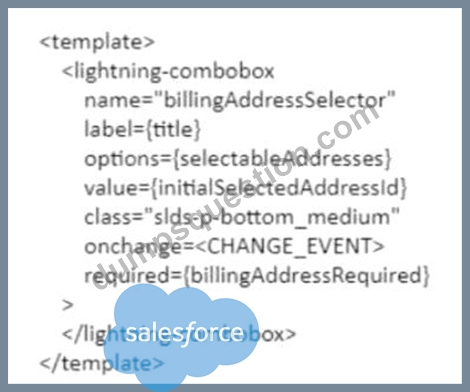
- A. {event:handleChange}
- B. javascript:void(0);handleChange();
- C. {handleChange}
- D. {handleChange()}
Answer: C
Explanation:
To handle changes on the combobox, the developer should replace <CHANGE EVENT> with
{handleChange}. The handleChange is a function that is defined in the JavaScript file of the Lightning web component and is invoked when the value of the combobox changes. The developer can use this function to perform custom logic or actions based on the selected value of the combobox, such as updating other components or properties, calling Apex methods or services, or firing events. The developer can use the onchange attribute to bind the handleChange function to the combobox element in the HTML file of the Lightning web component. The onchange attribute is an HTML attribute that specifies a function to be executed when the value of an element changes. {event:handleChange} is not a valid way to handle changes on the combobox, as it is not a valid syntax for binding a function to an element.
javascript:void(0);handleChange(); is not a valid way either, as it is not a valid syntax for binding a function to an element. {handleChange()} is not a valid way either, as it is not a valid syntax for binding a function to an element. Salesforce References: Lightning Web Components Developer Guide: Handle Events, Lightning Web Components Developer Guide: Communicate with Properties, Lightning Web Components Developer Guide: lightning-combobox
NEW QUESTION # 79
Where is the API-based record creation generally handled in Salesforce B2B Commerce?
- A. In the methods available in extension hooks
- B. Logic classes that implement the businesslogic for create operations
- C. The service-layer responsible for the entity
- D. Data creation is not allowed
Answer: C
Explanation:
The API-based record creation is generally handled in the service-layer responsible for the entity in Salesforce B2B Commerce. The service-layer is a set of classes that provide methods for interacting with the data layer and performing business logic. Each entity, such as product, cart, or order, has a corresponding service class that handles the create, read, update, and delete operations for that entity. For example, ccrz.ccServiceProduct provides methods for creating and retrieving products. Salesforce Reference: B2B Commerce and D2C Commerce Developer Guide, Service Classes
NEW QUESTION # 80
What two things happen with the Cart during tax implementation?
- A. Previous entries are copied to another object
- B. Previous entries are deleted from the Cart
- C. New entries are written to the Order Summary
- D. New entries are written to the Cart
Answer: B,D
Explanation:
Explanation
Two things that happen with the cart during tax implementation are that new entries are written to the cart and previous entries are deleted from the cart. A tax implementation is an integration that calculates and applies tax rates and amounts to a cart or an order based on various factors, such as product type, price, quantity, location, and tax rules. A tax implementation can use either an external tax service provider or custom Apex code to perform the tax calculation. When a tax implementation is invoked for a cart, it writes new entries to the cart with a type of Charge and a charge type of Tax. These entries represent the tax amounts and adjustments that are applied to the cart. Before writing new entries to the cart, the tax implementation deletes any existing entries with a type of Charge and a charge type of Tax from the cart. This ensures that the tax calculation is accurate and up-to-date based on the current state of the cart and avoids any conflicts or inconsistencies with previous tax entries. Previous entries are not copied to another object or modified with the new tax calculation, as these are not valid actions for handling existing tax entries. Salesforce References: B2B Commerce Developer Guide: Tax Integration, B2B Commerce Developer Guide: Tax Calculation Flow
NEW QUESTION # 81
Which two scoped modules should a developer import in Lightning web components to check user permissions?
- A. @salesforce/userPermission
- B. @salesforce/hasPermission
- C. @salesforce/permission
- D. @salesforce/customPermission
Answer: C,D
Explanation:
To check user permissions in Lightning web components, a developer should import two scoped modules:
@salesforce/permission and @salesforce/customPermission. The @salesforce/permission module allows the developer to check if the user has access to a standard permission, such as View Setup or Modify All Data.
The @salesforce/customPermission module allows the developer to check if the user has access to a custom permission, such as Enable Debug Mode or Manage Orders. The other modules do not exist or are not related to user permissions. Salesforce References: Lightning Web Components Developer Guide: Check User Permissions, Lightning Web Components Developer Guide: Import Salesforce Modules
NEW QUESTION # 82
Which Global JavaScript Object should be extended when
writing custom Remote Actions?
- A. CCRZ.
- B. CCRZ.RemoteInvocation
- C. CCRZ.cc
- D. CCRZ.cc_CallContext
Answer: C
Explanation:
The Global JavaScript Object that should be extended when writing custom Remote Actions is CCRZ.cc. This object contains all the Remote Actions that are defined in the cloudcraze managed package, which can be overridden or extended by subscriber code. The object also provides a mechanism for registering custom Remote Actions that can be invoked by the user interface components. For example, CCRZ.cc.customAction = function(params, callback){ // do something } will define a custom Remote Action named customAction that can be called by CCRZ.cc.customAction(params, callback). Salesforce Reference: B2B Commerce and D2C Commerce Developer Guide, Remote Actions
NEW QUESTION # 83
Which two practices are allowed when it comes to naming a Lightning Web Components folder and associated files?
- A. Using a single underscore
- B. Using a single hyphen (dash)
- C. Beginning with a lowercase letter
- D. Including whitespace
Answer: B,C
Explanation:
When naming a Lightning Web Components folder and associated files, Salesforce best practices allow the name to begin with a lowercase letter and to use a single hyphen (dash) for compound names.Whitespace and underscores are not recommended in the naming convention. This is in line with web standards for custom elements. More details can be found in the Salesforce LWC documentation on naming conventions:Salesforce LWC Naming Conventions.
NEW QUESTION # 84
Salesforce B2B Commerce natively provides a robots.txt file, however, a customer can also create its own version.Which three scenarios are valid reasons for customer to create their own robots.txt file? (3 answers)
- A. The customer wants to reference multiple storefront sitemap indexes in a single robots.txt file
- B. The customer wants to have multiple robot.txt files in a single Salesforce Community.
- C. The customer's store is not located at the rootof their domain.
- D. The customer wants to reference a custom sitemap index.
- E. robot.txt only works if there is one storefront in the org
Answer: A,C,D
Explanation:
A customer can create its own robots.txt file for three valid reasons:
The customer wants to reference multiple storefront sitemap indexes in a single robots.txt file. This can be useful if the customer has multiple storefronts under the same domain and wants to provide a single entry point for search engines to crawl their sitemaps.
The customer wants to reference a custom sitemap index. This can be useful if the customer has created their own sitemap index that contains custom sitemaps or sitemaps from other sources.
The customer's store is not located at the root of their domain. This can be useful if the customer has their store under a subdirectory or a subdomain and wants to specify a different robots.txt file for their store than for their main domain. Salesforce Reference: B2B Commerce and D2C Commerce Developer Guide, Robots.txt File
NEW QUESTION # 85
When a user buys 10 units of product B, the user wants 1 unit of Product A to be automatically added to the cart. How can this requirement be fulfilled?
- A. Override the prepareToAdd method in ccrz.cc_api_CartExtension
- B. Override the AllowCheckout method in ccrz.cc_api_CartExtension
- C. Override the prepareForSave method in ccrz.cc_api_CartExtension
- D. Override the preprocess method in ccrz.cc_api_CartExtension
Answer: D
NEW QUESTION # 86
In a B2B Commerce store, which three tasks must a developer complete to implement the use of a third-party service for either tax, shipping, or pricing calculation?
- A. Register an Apex class as the integration in the store administration
- B. Create an Apex class implementing the appropriate interface.
- C. Create an Apex class with an invocable method
- D. Create a flow to call the external service directly
- E. Create a named credential for authentication with an external service
Answer: A,B,E
Explanation:
To implement the use of a third-party service for either tax, shipping, or pricing calculation in a B2B Commerce store, a developer must complete these three tasks:
* Create an Apex class that implements the appropriate interface for the calculation type. For example, for tax calculation, the developer must implement the sfdc_checkout.CartTax interface and define the getTax method. This method takes a Cart object as an input parameter and returns a list of CartTax
* objects with the calculated tax amounts.
* Create a named credential for authentication with the external service. A named credential specifies the URL of a callout endpoint and its required authentication parameters. The developer can use the named credential in the Apex class to make the callout to the external service and handle the response.
* Register the Apex class as the integration in the store administration. The developer must specify the Apex class name in the corresponding field for the calculation type. For example, for tax calculation, the developer must enter the Apex class name in the Tax Calculation Integration field. This way, the store can invoke the Apex class to perform the calculation for each cart.
The other options are not valid tasks for implementing the use of a third-party service. Creating a flow to call the external service directly is not supported for B2B Commerce, and creating an Apex class with an invocable method is not required for the calculation integration. References:
* Integrate with External Services
* CartTax Interface
* Named Credentials
* [Store Administration]
NEW QUESTION # 87
The sizing keys used in the Salesforce B2B Commerce Global APIs five distinct operations. What are three of these operations? (3 answers)
- A. Return formats as Map<String, Object> or SObjects lists
- B. Object type casting
- C. Override static DAO classes and methods
- D. Related Query to call (sub queries or direct queries)
- E. Refetch data (used on some Logic classes)
Answer: A,D,E
NEW QUESTION # 88
Salesforce B2B Commerce natively provides a robots.txt file, however, a customer can also create its own version.Which three scenarios are valid reasons for customer to create their own robots.txt file? (3 answers)
- A. The customer wants to reference multiple storefront sitemap indexes in a single robots.txt file
- B. The customer's store is not located at the root of their domain.
- C. The customer wants to have multiple robot.txt files in a single Salesforce Community.
- D. The customer wants to reference a custom sitemap index.
- E. robot.txt only works if there is one storefront in the org
Answer: A,B,D
NEW QUESTION # 89
While in the process of gathering requirements from a customer about how they would like to set up their net new storefront checkout experience, a consultant learns that the customer needs the ability to add new shipping and billing addresses during checkout.
Which approach should a developer take to meet this requirement?
- A. Enable Buyer Managed Contact Point Addresses within the Shipping Address standard component in the Checkout subflow.
- B. Create a Lightning web component that enables this functionality and replaces the current shipping address screen within the Checkout subflow.
- C. Create a new shipping address checkout subflow that utilizes the Buyer Managed Contact Point Addresses component.
- D. Enable Buyer Managed Contact Point Addresses within Commerce Administration.
Answer: A
Explanation:
To enable the ability to add new shipping and billing addresses during checkout, a developer should enable Buyer Managed Contact Point Addresses within the Shipping Address standard component in the Checkout subflow. The Buyer Managed Contact Point Addresses is a feature that allows customers to add, edit, or delete their shipping and billing addresses during checkout. The developer can enable this feature by setting the buyerManagedContactPointAddressesEnabled attribute to true in the Shipping Address standard component in the Checkout subflow. The Shipping Address standard component is a component that displays and collects the shipping address information for the cart or order. The Checkout subflow is a subflow that defines the steps and components for the checkout process in the storefront. Creating a new shipping address checkout subflow that utilizes the Buyer Managed Contact Point Addresses component is not a valid way to enable this feature, as there is no such component as Buyer Managed Contact Point Addresses. Enabling Buyer Managed Contact Point Addresses within Commerce Administration is not a valid way either, as this feature is not configurable in Commerce Administration. Creating a Lightning web component that enables this functionality and replaces the current shipping address screen within the Checkout subflow is not a valid way either, as this is unnecessary and complicated when there is already a standard component that supports this feature. Salesforce References: [B2B Commerce Developer Guide: Buyer Managed Contact Point Addresses],
[B2B Commerce Developer Guide: Shipping Address Component], [B2B Commerce Developer Guide:
Checkout Subflow]
NEW QUESTION # 90
A developer has just deployed a new Lightning Web Component to an authorized org. What should the developer do next to use the new component on apage?
- A. Go to "Deploy LWC" in Setup.
- B. Go to the page, edit it, and drag the new component onto the page.
- C. Navigate 3 to the Page, Click on the "Custom Component Editor,' Click "Publish" on the new component in the list and adjust the positioning.
- D. Create a Metadata API (MDAPI) conversion file with the Command Line interface (CLI) then go to the page and adjust the positioning.
Answer: B
Explanation:
After deploying a new Lightning Web Component (LWC) to an org, the typical next step to use the component on a page involves navigating to that page, entering the edit mode (usually through App Builder or a similar interface), and then dragging the new component from the components palette onto the desired location on the page. This process is consistent with Salesforce's modular design approach, allowing for easy integration and configuration of components within the Salesforce ecosystem.
NEW QUESTION # 91
Inwhich three different ways can a theme be enabled in
Salesforce B2B Commerce? (3 answers)
- A. A Storefront setting
- B. An Account Group field value
- C. Account
- D. Dynamically through a hook
- E. A per user setting
Answer: A,B,D
Explanation:
A theme can be enabled in Salesforce B2B Commerce in three different ways:
A Storefront setting: The theme can be specified in the Storefront Configuration settings in CCAdmin. This will apply the theme to all users who access the storefront.
An Account Group field value: The theme can be specified in the Theme field of an Account Group record in Salesforce. This will apply the theme to all users who belong to that account group.
Dynamically through a hook: The theme can be specified dynamically by extending the cc_hk_theme hook. This hook allows changing the theme based on various factors, such as the user, cart, product, or storefront. For example, the hook can apply a different theme for a specific product category or for a specific user segment.
NEW QUESTION # 92
......
Salesforce B2B-Commerce-Developer exam is designed to test the knowledge and skills of those who want to become certified Salesforce Accredited B2B Commerce Developers. Salesforce Accredited B2B Commerce Developer certification is intended for individuals who have experience in designing and developing eCommerce solutions using Salesforce B2B Commerce Cloud. B2B-Commerce-Developer exam measures the candidate's understanding of the B2B Commerce Cloud architecture, data model, security features, and integrations with other Salesforce Clouds.
Exam Materials for You to Prepare & Pass B2B-Commerce-Developer Exam: https://examsdocs.dumpsquestion.com/B2B-Commerce-Developer-exam-dumps-collection.html