

WatchGuard Network-Security-Essentials Certification All-in-One Exam Guide Jun-2026
Get Real Network-Security-Essentials Exam Dumps [Jun-2026] Practice Tests
NEW QUESTION # 32
With the policies configured as shown in this image, HTTP traffic can be sent and received through Branch Office VPN tunnel 1 and tunnel 2.
- A. True
- B. False
Answer: A
Explanation:
The image shows firewall policies allowing HTTP traffic throughBranch Office VPN (BOVPN)tunnel 1 and tunnel 2:
* tunnel1-http.outpolicy: Allows HTTP traffic (TCP port 80) fromAnysource totunnel 1.
* tunnel1-http.inpolicy: Allows HTTP traffic fromtunnel 1toAnydestination.
* BOVPN-Allow.outandBOVPN-Allow.inpolicies: Configured to allowAnytraffic betweentunnel 2and tunnel 1in both directions.
These configurations indicate that HTTP traffic is permitted through both tunnels, enabling it to be sent and received across BOVPN tunnels 1 and 2. Thus, users on either end of these VPN tunnels can transmit HTTP traffic successfully.
NEW QUESTION # 33
What is true about this log message? (Select three.)
- A. The Application Control service has identified the traffic as Gmail
- B. The HTTPS proxy identified a TLS v1.3 connection to the inbox.google.com SNI domain
- C. The traffic is allowed outbound through the Firebox
- D. The traffic is allowed inbound through the Firebox
- E. The Gateway AntiVirus service denied the email traffic because it matches the 18.254 virus signature
Answer: A,B,C
Explanation:
Application Control Identifying Gmail Traffic: Application Control is capable of identifying and categorizing applications based on traffic patterns and signatures. In this case, it recognizes Gmail traffic, which is a typical function of Application Control for managing and monitoring web applications. This functionality allows administrators to monitor and control access to applications based on organizational policies.
HTTPS Proxy Identifies TLS v1.3 Connection: The HTTPS proxy in Firebox can inspect and manage encrypted traffic by recognizing details such as the Server Name Indication (SNI) field in TLS connections.
By identifying a TLS v1.3 connection to the inbox.google.com domain, the HTTPS proxy provides additional monitoring and control capabilities over encrypted connections.
Traffic Allowed Outbound Through the Firebox: Given that the log indicates outbound traffic, this confirms that the connection is permitted by the Firebox's policies for outbound traffic. Outbound traffic control is crucial for managing access to external resources and ensuring that only authorized traffic exits the network.
NEW QUESTION # 34
If a Firebox has two trusted interfaces enabled, the default policies allow HTTPS connections between computers on different trusted networks.
- A. False
- B. True
Answer: A
Explanation:
By default, Firebox policies do not allow HTTPS connections between devices on separate trusted networks without specific policy configuration. Firebox's default security posture is to restrict inter-network traffic unless explicitly permitted, enhancing network segmentation and security within trusted zones.
NEW QUESTION # 35
After you enable content inspection, your users cannot connect to the business-critical website www.example.
com/account.html hosted by a trusted partner. To try to resolve this issue, you added a Domain Name exception of www.example.com/account.html, but users still cannot connect to the website. What is the Domain Name exception format to add to the HTTP proxy to correctly resolve this issue? (Select two.)
- A. example.com/
- B. www.example.com
- C. *.example.com
- D. /account.html
- E. /example.com/
Answer: B,C
Explanation:
When using domain exceptions to bypass content inspection for specific websites on a Firebox, the format is critical. For the domain www.example.com/account.html, two viable exception formats are:
* A. *.example.com: This wildcard format will include all subdomains of example.com, covering www.
example.com as well as any other subdomains like api.example.com. This format is useful when you need to exclude an entire domain and its subdomains from content inspection.
* D. www.example.com: This specifies the exact domain. Adding this as an exception will directly match www.example.com, making it suitable for bypassing content inspection on that specific subdomain.
Other formats, like /example.com/ or /account.html, do not match the required structure for domain name exceptions in the Firebox HTTP proxy settings.
NEW QUESTION # 36
In a Mobile VPN configuration, why would you choose default-route (full tunnel) VPN instead of split tunnel VPN? (Select one.)
- A. Default-route VPN enables your Firebox to examine all remote user traffic.
- B. Default-route VPN uses less bandwidth.
- C. Default-route VPN automatically allows dynamic NAT.
- D. Default-route VPN uses less processing power.
- E. Default-route VPN is the only option you can use to apply security services to connections routed to your internal servers.
Answer: A
Explanation:
In a Mobile VPN setup, adefault-route (full tunnel)VPN routes all of a remote user's internet traffic through the VPN tunnel to the Firebox. This configuration allows the Firebox to inspect and apply security policies to all traffic, including traffic that is not destined for internal network resources. In contrast, asplit tunnel VPN would route only traffic meant for the internal network through the VPN, while internet-bound traffic would bypass the Firebox, potentially exposing it to threats and limiting the Firebox's ability to inspect all traffic.
NEW QUESTION # 37
You want to create a branch office VPN virtual interface between a remote Firebox and your headquarters Firebox so the remote Firebox can send log data to a server at headquarters. For the log data to be sent from the remote Firebox over the VPN successfully, what BOVPN virtual interface setting must you configure?
(Select one.)
- A. An IPSec certificate, instead of a Pre-shared key
- B. Dead Peer Detection (DPD)
- C. IKEv2 in the Phase 1 settings
- D. Virtual IP addresses
- E. Perfect Forward Secrecy (PFS)
Answer: D
Explanation:
To enable the remote Firebox to send log data to a server at headquarters through a Branch Office VPN (BOVPN) virtual interface, you must configureVirtual IP addresses. Virtual IPs enable devices on either end of the VPN tunnel to communicate as if they are on the same network, facilitating routing of log data from the remote Firebox to the log server located at headquarters.
Other options likeIPSec certificatesandIKEv2are not specifically required for this configuration, though they can enhance security.Dead Peer Detection (DPD)andPerfect Forward Secrecy (PFS)are useful for maintaining VPN stability and security but are not directly necessary for enabling log transmission.
NEW QUESTION # 38
Before packets are examined by Default Threat Protection, they are processed by firewall policies in top- down order.
- A. True
- B. False
Answer: A
Explanation:
In Firebox configuration, packets are processed by firewall policies in atop-down orderbefore they reach Default Threat Protection. This ordering ensures that the firewall policies defined higher in the policy list take precedence. Packets are evaluated against each rule sequentially from top to bottom until a matching policy is found, which then determines the action taken (allow, deny, or inspect further). Only after this process will any unfiltered traffic be subject to Default Threat Protection for additional security checks.
NEW QUESTION # 39
Which of the following management interfaces can provide real-time diagnostic information? (Select two.)
- A. Log and Report Server
- B. Policy Manager
- C. Fireware Web UI
- D. Firebox System Manager
- E. Dimension
Answer: C,D
Explanation:
The Firebox System Manager (FSM) and Fireware Web UI are two key interfaces in Firebox devices for local management that offer real-time diagnostic information.
* Firebox System Manager (FSM): FSM provides a graphical interface that allows administrators to monitor traffic in real-time, view logs, and analyze performance metrics directly from the device. This interface includes specific tools such as Traffic Monitor and Subscription Services, which display current activity and status of security services, respectively. FSM is highly effective in immediate diagnostics due to its continuous update capabilities.
* Fireware Web UI: Fireware Web UI, another management interface available in Firebox, offers similar diagnostic functionalities but is accessible through a web browser. This interface is essential for remote diagnostics and provides real-time views on device status, traffic, and security service health.
The Web UI is particularly beneficial for quick access without needing specialized client software like FSM, making it convenient for on-the-go monitoring.
These two interfaces are central to Firebox management and are designed to streamline real-time monitoring and diagnostics, ensuring network health is visible and manageable at all times.
NEW QUESTION # 40
Your users have no network connectivity on their computers in the 10.0.40.0/24 network. You investigate and discover the DHCP address pool for this network is exhausted, but there are no available IP addresses in the network to assign. Which of these options can you use to expand the IP address space of this network? (Select two.)
- A. Create a Dynamic NAT rule for traffic from the 10.0.40.1/24 network going to the 10.0.50.1/24 network
- B. Change the IP address of the 10.0.40.1/24 network to 10.0.40.123/24
- C. Add 10.0.50.1/24 to the 10.0.40.1/24 network as a secondary network
- D. Enable a wireless SSID for the 10.0.40.1/24 network
- E. Bridge the 10.0.40.1/24 network across additional interfaces
Answer: C,E
Explanation:
* Adding a Secondary Network (10.0.50.1/24): By adding a secondary subnet (such as10.0.50.1/24) to the existing 10.0.40.1/24 network, you expand the IP address space, effectively increasing the number of available IP addresses for DHCP allocation.
* Bridging Across Additional Interfaces: Bridging the 10.0.40.1/24 network across multiple interfaces can also increase the available address pool by creating a larger logical network. This approach helps manage IP space across a broader range of devices without subnet fragmentation.
These methods provide scalable solutions to expand IP address availability within constrained network spaces.
NEW QUESTION # 41
In the network configuration shown in this image, which aliases include Eth2 as a member? (Select three.)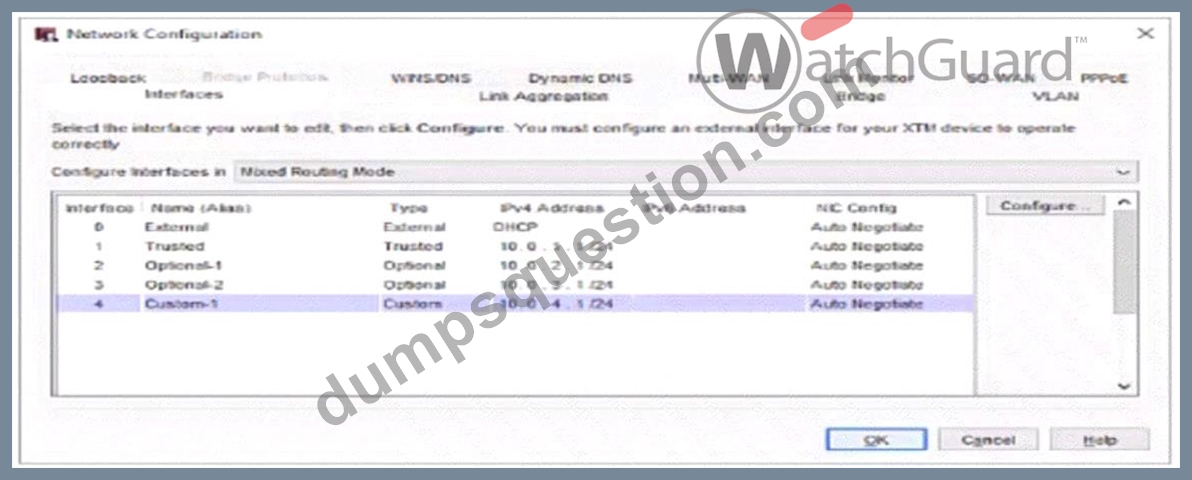
- A. Any-External
- B. Any-Trusted
- C. Any
- D. Optional-1
- E. Any-Optional
Answer: C,D,E
Explanation:
In the network configuration image provided, the interfaceOptional-1is mapped toEth2. Here's how the aliases work:
* Optional-1: Directly includes Eth2 since it's configured as Optional-1 in the network configuration.
* Any-Optional: This alias includes all optional interfaces, which would cover Eth2 as it is associated with Optional-1.
* Any: The "Any" alias includes all interfaces on the Firebox, covering all Trusted, Optional, and External interfaces. Thus, Eth2 is part of this alias by default.
Aliases likeAny-TrustedandAny-Externalwould not include Eth2 since it is configured as an Optional interface, not Trusted or External.
NEW QUESTION # 42
You can add your Firebox to WatchGuard Cloud but continue to manage it locally. When you do this, what additional features does WatchGuard Cloud provide for your locally-managed Firebox? (Select two.)
- A. Unified event correlation and analysis
- B. Ability to schedule Firebox firmware updates
- C. Live status and access to reports
- D. Real-time network traffic data
- E. Automatic Firebox firmware updates
Answer: B,C
Explanation:
When adding a Firebox to WatchGuard Cloud while maintaining local management:
* Option B: WatchGuard Cloud allows the scheduling of Firebox firmware updates, which provides flexibility in managing update timing without disrupting operations.
* Option E: It provides live status updates and reporting access, giving insights into device health and performance metrics for informed management decisions.
* Option A(Automatic firmware updates) is typically managed manually in a locally managed configuration.
* Option C(Real-time network traffic data) andOption D(Unified event correlation andanalysis) are advanced features that require full cloud management rather than hybrid (local/cloud) setup.
NEW QUESTION # 43
You have an existing network infrastructure built out that uses tagged and untagged VLAN networks. Based on the diagram below, which VLANs must you add to the Firebox interface? (Select one.)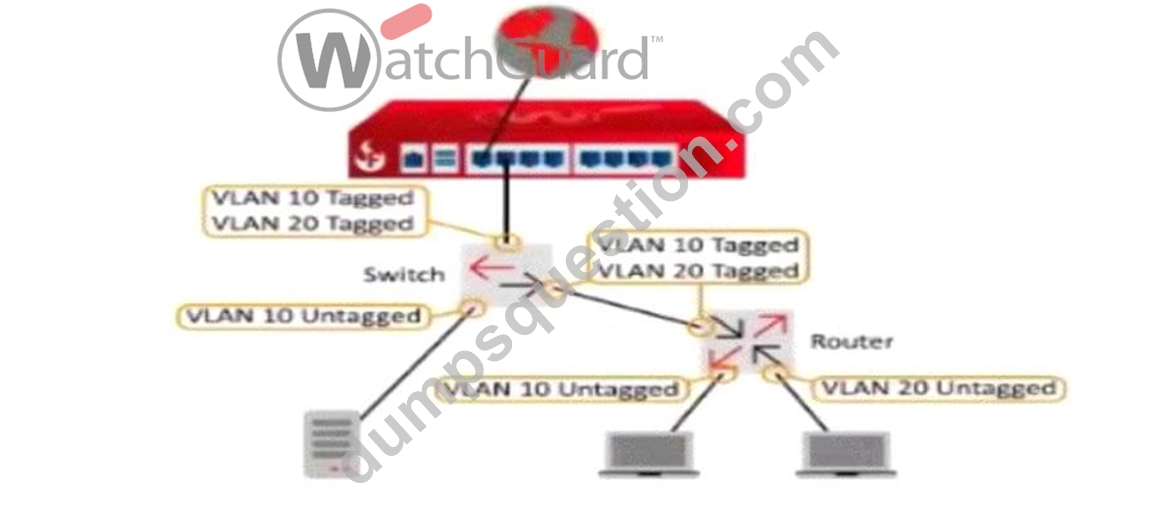
- A. VLAN 10 Tagged and VLAN 20 Untagged
- B. VLAN 10 Untagged and VLAN 20 Untagged
- C. VLAN 10 Untagged and VLAN 20 Tagged
- D. VLAN 10 Untagged, VLAN 10 Tagged, and VLAN 20 Tagged
- E. VLAN 10 Tagged and VLAN 20 Tagged
Answer: E
Explanation:
Based on the diagram provided, the Firebox connects to a switch with VLAN 10 and VLAN 20 as tagged traffic. The connection between the Firebox and the switch shows that both VLAN 10 and VLAN 20 are tagged, indicating that traffic for these VLANs will be carried over a single trunk link to the Firebox.
To properly configure the Firebox to handle this setup, you need to addVLAN 10 TaggedandVLAN 20 Taggedto the Firebox interface, as this configuration will allow the Firebox to interpret tagged packets for both VLANs from the switch. Untagged configurations are not applicable here since the Firebox interface expects tagged traffic for both VLANs on the trunk connection.
NEW QUESTION # 44
You lost access to a Firebox because no one knows the administrator passphrase. How can you regain access to the Firebox? (Select one.)
- A. Plug in a USB flash drive with the WatchGuard Password Reset utility loaded
- B. Connect with a console cable to reset the passphrase
- C. Restore a backup image of the Firebox
- D. Call WatchGuard Support for a passphrase reset
- E. Reset the Firebox to its factory defaults
Answer: E
Explanation:
If the administrator passphrase is lost:
* Option A: Resetting the Firebox to factory defaults is the recommended solution to regain access, as it clears the current configurations, including the admin passphrase, allowing reconfiguration from scratch.
* Option B(USB reset utility) andOption E(console cable reset) are not standard options for passphrase recovery on Firebox.
* Option C(Calling WatchGuard Support) cannot directly reset the passphrase.
* Option D(Restoring a backup) requires access to the device with the current passphrase.
NEW QUESTION # 45
There is an Internet outage at your primary ISP, but the Internet connection from the Firebox has not failed over to your backup ISP. Both ISP connectors are correctly cabled and have active physical links. What could cause this problem? (Select two.)
- A. In the Multi-WAN settings, the Gradual Fallback option is enabled
- B. Link Monitor target for the backup ISP interface is not responding
- C. The Link Monitor target for the primary ISP interface is set to ping the default gateway, but the outage is further upstream
- D. In the Multi-WAN settings, the Immediate Fallback option is enabled
- E. The secondary IP addresses are not defined for the backup ISP interface
Answer: B,C
Explanation:
* Link Monitor Target for Backup ISP: If the backup ISP's Link Monitor target is not responsive, the Firebox will not initiate a failover, as it interprets the backup connection as inactive or faulty.
* Primary ISP Link Monitor Configuration: When the Link Monitor for the primary ISP only checks the default gateway, it may not detect issues occurring further upstream. If the outage is beyond the gateway, failover will not activate because the monitor assumes the link is still valid.
These settings are critical to ensuring proper Multi-WAN failover behavior in case of ISP issues.
NEW QUESTION # 46
Which WatchGuard tools can you use to review the traffic log messages generated by your Firebox? (Select three.)
- A. WatchGuard Cloud
- B. Policy Manager
- C. FireWatch
- D. Dimension
- E. Status Report
- F. Traffic Monitor
Answer: C,D,F
Explanation:
* FireWatch: FireWatch provides a visual interface to monitor traffic and review log messages related to network activities on the Firebox. It offers real-time visibility into network usage, highlighting application activity and bandwidth utilization, which helps in analyzing traffic patterns and reviewing logs.
* Traffic Monitor: Traffic Monitor is an integral part of the Firebox System Manager, which displays detailed logs of network traffic. Administrators can use Traffic Monitor to review live traffic logs, filter traffic based on criteria, and troubleshoot network issues by examining these logs.
* Dimension: WatchGuard Dimension is a cloud-based logging and reporting solution that aggregates log messages from multiple Fireboxes. Dimension provides comprehensive reporting and enables administrators to analyze traffic patterns, detect potential threats, and generate detailed log-based reports for security audits and monitoring.
These tools are commonly used in WatchGuard environments for reviewing traffic log messages and ensuring thorough monitoring of network activities.
NEW QUESTION # 47
What are some advantages of BOVPN virtual interfaces (route-based VPN) over classic policy-based BOVPNs? (Select two.)
- A. Increased BOVPN throughput
- B. Additional keep-alive options
- C. Supports VPN connectivity to cloud services
- D. Additional encryption options
- E. More flexible routing options
Answer: C,E
Explanation:
BOVPN virtual interfaces (route-based VPNs)offer several advantages over traditional policy-based BOVPNs:
* Supports VPN connectivity to cloud services (A): Route-based VPNs can more easily integrate with cloud environments, as they use routing rather than specific policies, making it possible to route traffic to various cloud services and manage cloud-based VPN connections.
* More flexible routing options (C): Route-based VPNs allow administrators to define more granular routing rules using standard IP routing tables. This flexibility supports complex network architectures and multiple routes for redundancy or load balancing.
These features make route-based VPNs more adaptable to modern network needs, particularly in hybrid and multi-cloud environments.
NEW QUESTION # 48
To accurately detect applications over an HTTPS connection with Application Control, you must enable content inspection in the HTTPS proxy.
- A. True
- B. False
Answer: A
Explanation:
For Application Control to accurately detect and manage applications over HTTPS connections, content inspection must be enabled in the HTTPS proxy. This is because HTTPS encrypts application traffic, making it unreadable without decryption. By enabling content inspection, the HTTPS proxy can inspect and classify the application traffic within HTTPS sessions, allowing Application Control to function effectively on secure connections.
NEW QUESTION # 49
Users cannot download a PDF file from your intranet. You know the file is safe to download. When you review the log messages, you see that IntelligentAV identified the file as malicious. The only way to resolve this is to change the file extension.
- A. False
- B. True
Answer: A
Explanation:
When IntelligentAV identifies a file as malicious, users have options other than changing the file extension to resolve the issue. IntelligentAV relies on AI-driven detection, and if the PDF file isknown to be safe, an administrator can manually adjust the IntelligentAV settings or add an exception for the specific file.
Changing the file extension alone does not address the root of the detection and is not a reliable solution to bypass IntelligentAV checks.
NEW QUESTION # 50
What does a Firebox configured with default firewall policies do with outbound traffic that does not have a configured route? (Select one.)
- A. Denies the traffic
- B. Sends the traffic to the default gateway
- C. Drops the traffic
- D. Sends the traffic to the loopback interface
Answer: C
Explanation:
When a Firebox is configured with default firewall policies and encounters outbound traffic that lacks a specified route, the Firebox will drop this traffic. In firewall configurations, if there's no matching route or policy, the traffic typically gets discarded by default to prevent unintended data leakage or unauthorized connections. This behavior is standard for most firewall devices to ensure secure handling of unconfigured paths.
NEW QUESTION # 51
You enable a network device monitoring application on a server with IP address 10.0.1.22. After you run the application, it reports that it cannot ping the Firebox at 10.0.1.1, and you see this log message in Traffic Monitor. What is the most likely cause of this issue? (Select one.)
- A. The server IP address is on the Blocked Sites list
- B. There is no route on the Firebox for the 10.0.1.0/24 subnet
- C. The dynamic NAT statement is not configured correctly for the 10.0.1.0/24 subnet
- D. The default Unhandled Internal Packet policy is at the top of the policy set
- E. There is no policy that allows Ping traffic from the server to the Firebox alias
Answer: E
Explanation:
The most likely reason for the network device monitoring application's failure to ping the Firebox is the absence of an explicit policy permitting Ping traffic from the server (IP 10.0.1.22) to the Firebox alias (10.0.1.1). By default, Firebox policies are configured to allow only traffic explicitly permitted by a policy.
Therefore, without a dedicated policy allowing ICMP (Ping) requests from this specific source to the Firebox, the device will drop the traffic, resulting in a connectivity failure for Ping.
This is a common scenario in Firebox configurations, where restrictive policy settings enhance network security by blocking all traffic types unless specifically allowed.
NEW QUESTION # 52
When you configure a Branch Office VPN tunnel to a third-party device, AES-GCM encryption is recommended for:
- A. Routing over a BOVPN
- B. Connections to third-party firewalls only
- C. Troubleshooting purposes
- D. Better performance and throughput when supported by both VPN endpoints
- E. Better uptime because of additional keep-alive options
Answer: D
Explanation:
AES-GCM (Galois/Counter Mode)encryption is recommended for VPNs because it provides strong encryption with high performance and low overhead, making it an ideal choice for environments where both endpoints support it. AES-GCM combines encryption and authentication in a single step, resulting in faster processing compared to traditional encryption modes that handle these tasks separately. This mode is advantageous for maintaining high throughput in VPN tunnels, especially beneficial for branch office or inter- site VPNs where performance is critical.
NEW QUESTION # 53
A Firebox has an external IP address of 203.0.113.100. A public web server with the IP address 10.0.1.80 is connected to a Firebox internal network. What is the effect of the policy shown in this image? (Select one.)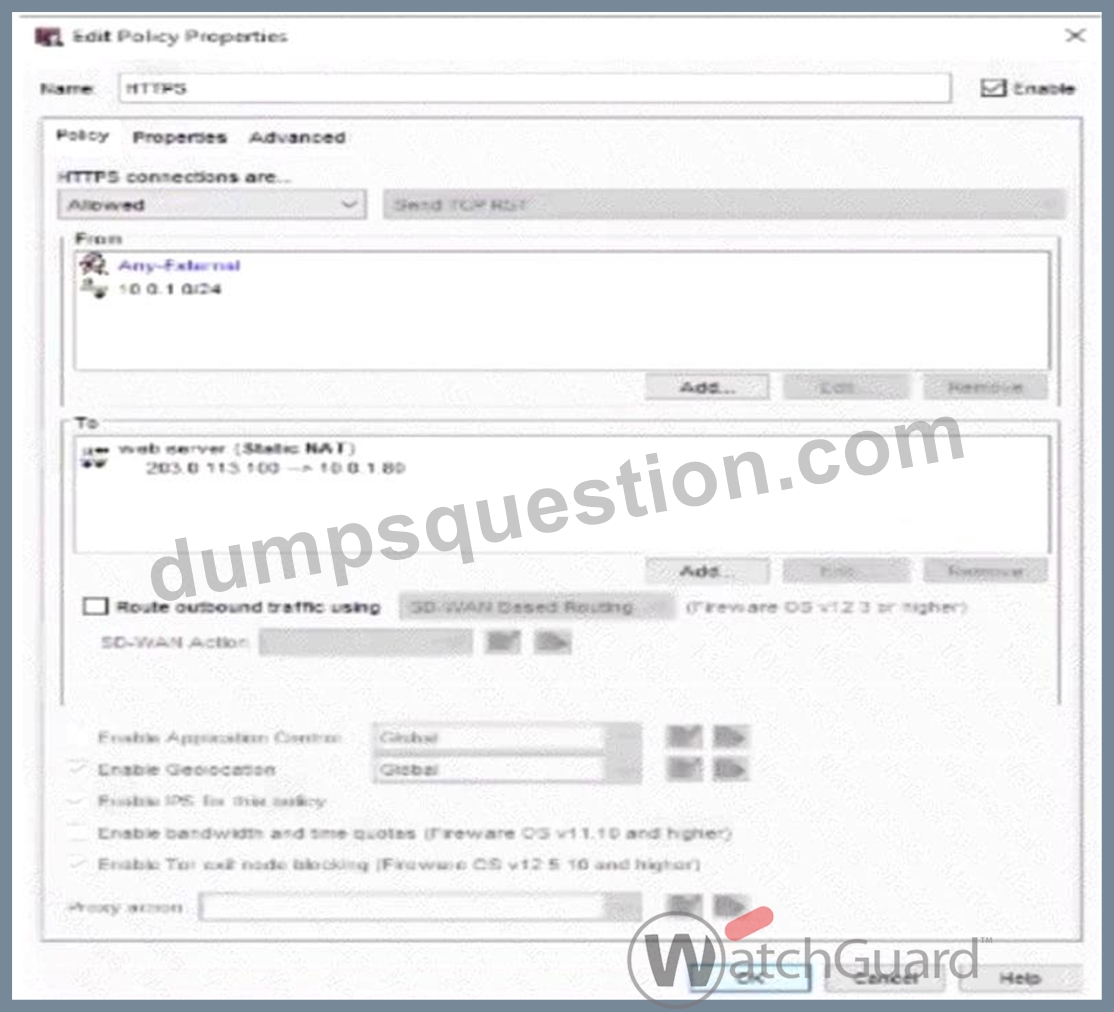
- A. Allows users on the Internet to connect to the 10.0.1.80 IP address of the web server
- B. Allows users on the Internet and the 10.0.1.0/24 network to use the internal IP address of the Firebox to connect to the web server
- C. Allows users on the Internet and the 10.0.1.0/24 network to use the external IP address of the Firebox to connect to the web server
- D. Applies dynamic NAT to the 10.0.1.80 IP address of the web server to allow inbound connections
Answer: C
Explanation:
In the policy configuration shown in the image:
* From Section: It specifies "Any-External" and 10.0.1.0/24, indicating that this policy applies to traffic from any external source (Internet users) as well as from devices on the internal network 10.0.1.0/24.
* To Section: The destination specifies a public-facing IP address (203.0.113.100) that is statically NAT'd to the internal IP address of the web server (10.0.1.80). This means external users and internal users can access the web server using the Firebox's external IP.
* Effect of Static NAT: The policy uses Static NAT to map the Firebox's external IP address to the web server's internal IP address, allowing inbound connections to reach the server. This setup provides consistent access for both external and internal users via the same public IP address.
This configuration effectively enables both Internet users and users within the specified internal network (10.0.1.0/24) to connect to the web server using the Firebox's external IP, makingOption Dthe correct answer.
NEW QUESTION # 54
You configured email notifications in WatchGuard Cloud for your Firebox Device Alarms and want to receive an email when your users download any .exe files through an HTTP proxy. You must enable what type of log message in the Firebox configuration? (Select one.)
- A. Alarm logs for the EXE/DLL Body Content rule in the HTTP proxy
- B. Diagnostic logs for Gateway AntiVirus
- C. Alarm logs for when a virus is detected in the HTTP proxy
- D. Allowed traffic logs for the HTTP proxy policy
- E. Denied traffic logs for the HTTP proxy policy
Answer: A
Explanation:
To receive email notifications when users download .exe files through an HTTP proxy, you need to enable Alarm logs for the EXE/DLL Body Content rulein the HTTP proxy configuration on the Firebox. This setting ensures that alerts are triggered whenever executable files are detected, and WatchGuard Cloud can send notifications based on these alarms.
Other logging options, such as allowed or denied traffic logs, would not provide the specific alerts required for .exe file downloads through the proxy.
NEW QUESTION # 55
In Firebox System Manager, where can you perform each of these tasks?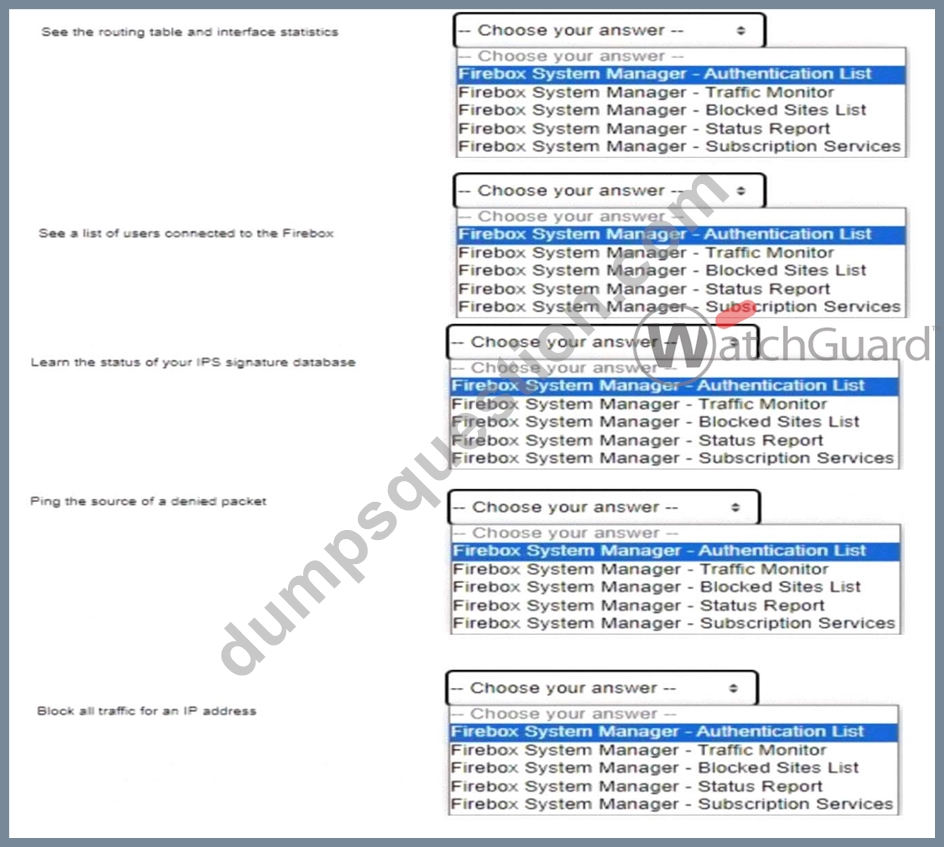
Answer:
Explanation: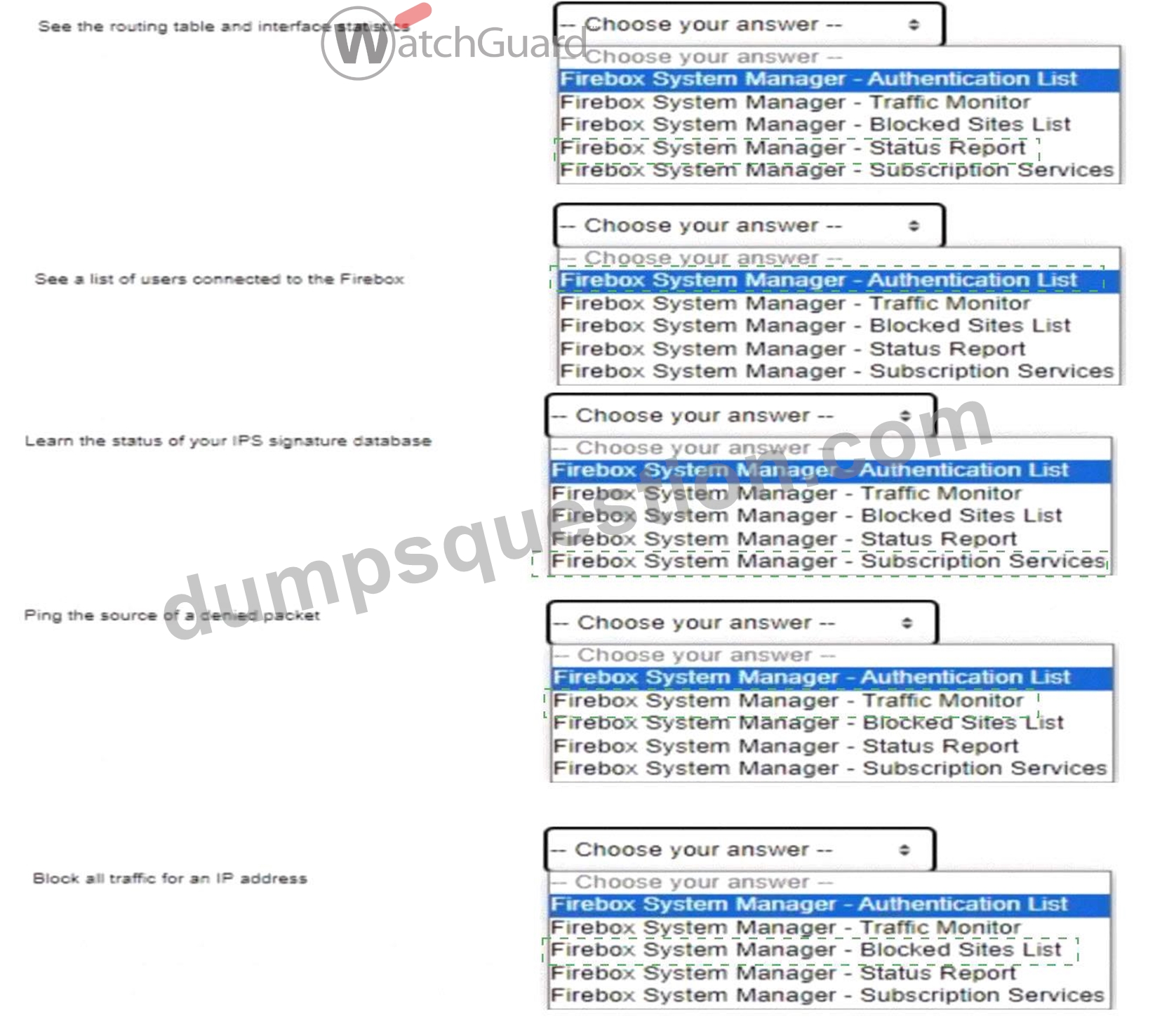
Explanation:
Here are the correct answers based on the Firebox System Manager interface functions:
* See the routing table and interface statisticsanswer:Firebox System Manager - Status Report Explanation: The Status Report section in Firebox System Manager includes information on network routing and interface statistics, providing insights into network paths and interface performance.
* See a list of users connected to the Fireboxanswer:Firebox System Manager - Authentication List Explanation: The Authentication List displays all active user sessions connected to the Firebox, showing authenticated users and their session details.
* Learn the status of your IPS signature databaseanswer:Firebox System Manager - Subscription Services Explanation: Subscription Services in FSM gives information on the status of services like IPS, showing the update status and version of the signature database.
* Ping the source of a denied packetanswer:Firebox System Manager - Traffic Monitor Explanation: The Traffic Monitor tool allows administrators to track packet details and offers functionality to ping sources directly, aiding in network troubleshooting.
* Block all traffic for an IP addressanswer:Firebox System Manager - Blocked Sites List Explanation: The Blocked Sites List feature in FSM lets administrators add IP addresses to a blacklist, blocking all incoming and outgoing traffic for specified addresses.
These answers utilize standard Firebox management features for performing administrative and diagnostic tasks efficiently. Let me know if you need further assistance with Firebox System Manager capabilities.
NEW QUESTION # 56
......
Last Network-Security-Essentials practice test reviews: Practice Test WatchGuard dumps: https://examsdocs.dumpsquestion.com/Network-Security-Essentials-exam-dumps-collection.html